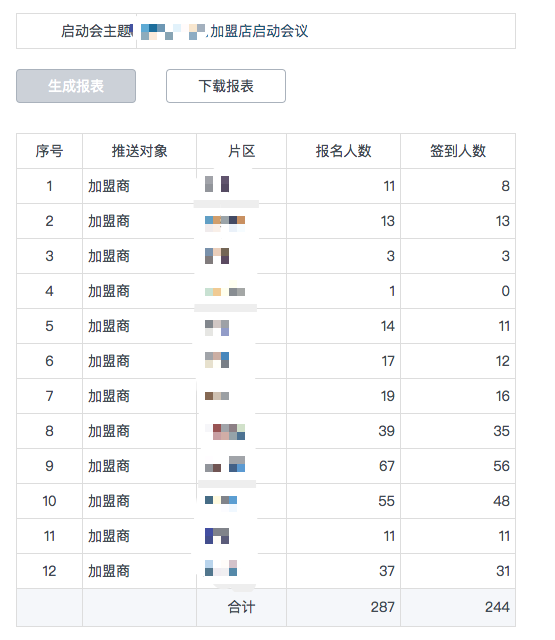
1. 一维报表
注意,要支持报表分页,就不能在查询SQL中使用临时表。
展示模板:
<!--结合表格样式width:max-content,防止手机屏幕无法左右滚动-->
<div style="width: 100%;overflow-x: scroll;height: 100%;">
<table id="tb_report1" class="tablesimpleline excel" border="1px" style="width: max-content;margin-left: 30px;margin-top: 30px;margin-bottom: 30px;">
    <tbody name="head">
        <tr class="firstRow">
            <td colspan="1" html="序号" rowspan="1" valign="null" width="null" style="text-align: center;">
                序号
            </td>
            <td html="推送对象" style="text-align: center;">
                推送对象
            </td>
            <td html="片区" style="text-align: center;">
                片区
            </td>
            <td html="报名人数" style="text-align: center;">
                报名人数
            </td>
            <td html="签到人数" style="text-align: center;">
                签到人数
            </td>
        </tr>
    </tbody>
    <tbody name="details">
        <tr>
            <td colspan="1" rowspan="1" html="{order}" style="text-align: center;">
                {order}
            </td>
            <td name="ord_tslx" fieldcaption="推送类型" html="{ord_tslx}">
                {ord_tslx}
            </td>
            <td name="ord_pq" fieldcaption="片区" html="{ord_pq}">
                {ord_pq}
            </td>
            <td name="ord_bmrs" fieldcaption="报名人数" html="{ord_bmrs}" style="text-align: right;">
                {ord_bmrs}
            </td>
            <td name="ord_qdrs" fieldcaption="签到人数" html="{ord_qdrs}" style="text-align: right;">
                {ord_qdrs}
            </td>
        </tr>
    </tbody>
    <tbody name="foot">
        <tr>
            <td colspan="1" rowspan="1" html="{order}"></td>
            <td name="ord_tslx" fieldcaption="推送类型" html="{ord_tslx}"></td>
            <td style="text-align: center;">
                合计
            </td>
            <td name="sum_ord_bmrs" fmt="#" style="text-align: right;"></td>
            <td name="sum_ord_qdrs" fmt="#" style="text-align: right;"></td>
        </tr>
    </tbody>
</table>
</div>
展示模板扩展js
/*下载不分页报表方法*/
var funDownload = function (content, filename) {
    // 创建隐藏的可下载链接
    var eleLink = document.createElement('a');
    eleLink.download = filename;
    eleLink.style.display = 'none';
    // 字符内容转变成blob地址
    var blob = new Blob([content]);
    eleLink.href = URL.createObjectURL(blob);
    // 触发点击
    document.body.appendChild(eleLink);
    eleLink.click();
    // 然后移除
    document.body.removeChild(eleLink);
};
/*下载不分页报表方法调用,其中"tb_report1"为要下载表格的id属性*/
function downloadhtml(){
    var content = $("#tb_report1");
    content.find("tbody[name=details]").remove();
    content = content.prop("outerHTML");
    /*下载的文件名自定义,Excel只能是xls*/
    funDownload(content,"启动会报名签到统计.xls")
}
数据模板:
最后结果需要tableid 字段,其内容需要设置为显示模板 iD
declare @t table(id bigint primary key identity(1,1), [推送类型] varchar(100),[片区] varchar(100),[报名人数] int ,[签到人数] int)
declare @t1 table( [推送类型1] varchar(100),[片区1] varchar(100),[签到人数1] int)

insert into @t([推送类型],[片区],报名人数)
select [推送类型],[片区],COUNT(10) 报名人数 from
(
    select  distinct
    convert(varchar(100),ord2_date,120) [日期] --datetime
    ,hy.ord_tsdx [推送类型]
    ,da.ord_rzbm [片区]
    ,ord2_gh [工号] --string
    ,ord2_xm [姓名] --string
    ,ord2_szdp [所在店铺] --string
    ,ord2_sfzh [身份证号] --string
    ,ord2_sjh [手机号] --string
    ,ord2_sfzs [是否住宿] --string
    ,ord2_sfbm [是否报名] --string
    ,ord2_qdcs [签到次数] --integer
    ,ord2_sfch [是否参会] --string
    ,case when ord2_dksj = '1900-01-01 00:00:00.000' then '' else  convert(nvarchar(100),ord2_dksj,120) end  [打卡时间] --datetime
    from  order_153_102 mx ,order_153 hy ,order_40 da
    where hy.ord_id = ord2_ordid
    and ord2_gh = da.ord_gh
    and ord2_sfbm ='是'
    and da.ord_rzbm<>''
    and hy.ord_id = {qdkordid}
) x
group by [推送类型],[片区]
order by [推送类型],[片区]


insert into @t1([推送类型1],[片区1],签到人数1)
select [推送类型],[片区],COUNT(10) 签到人数 from
(
    select  distinct
    convert(varchar(100),ord2_date,120) [日期] --datetime
    ,hy.ord_tsdx [推送类型]
    ,da.ord_rzbm [片区]
    ,ord2_gh [工号] --string
    ,ord2_xm [姓名] --string
    ,ord2_szdp [所在店铺] --string
    ,ord2_sfzh [身份证号] --string
    ,ord2_sjh [手机号] --string
    ,ord2_sfzs [是否住宿] --string
    ,ord2_sfbm [是否报名] --string
    ,ord2_qdcs [签到次数] --integer
    ,ord2_sfch [是否参会] --string
    ,case when ord2_dksj = '1900-01-01 00:00:00.000' then '' else  convert(nvarchar(100),ord2_dksj,120) end  [打卡时间] --datetime
    from  order_153_102 mx ,order_153 hy ,order_40 da
    where hy.ord_id = ord2_ordid
    and ord2_gh = da.ord_gh
    and ord2_sfbm ='是'
    and ord2_sfch = '是'
    and da.ord_rzbm<>''
    and hy.ord_id = {qdkordid}
) x
group by [推送类型],[片区]

update @t
set 签到人数 = 签到人数1
from @t1
where [推送类型] = [推送类型1]
and [片区] = [片区1]

select 'tb_report1' tableid,[推送类型] ord_tslx ,
        [片区] ord_pq,
        isnull([报名人数],0) [ord_bmrs],
        isnull([签到人数],0) [ord_qdrs]
from @t
运行结果: