1. 参与编写
| 编辑人 | 修改时间 | 修改内容 | 文档状态 |
|---|---|---|---|
| 张小猛 |
1.1.1. 前提
编辑本书前应具备以下几点知识:
- git使用
- gitbook的使用
- gitbook editor/typora(推荐)的使用
本书使用Git 管理,Gitbook 实现,而Gitbook又是markdown 语法,所以参与编写需要了解Git 、Gitbook 、 markdown ,建议按如下内容学习了解后参与编写:
1.Git 主要学习常用的 提交(commit )、回滚 (reset)、推送到服务器(push)、从服务器更新(fetch merge或pull,代码安全起见,建议使用前者)、文件冲突的解决、分支的概念、Git提交规范
2.Gitbook 主要了解 “什么是gitbook”、“gitbook如何协作协作”、“如何用编辑器(typora(推荐) 或Gitbook editor) 编辑gitbook”
3.markdown 需要学习的有“markdown 语法”、"markdown图文混排"
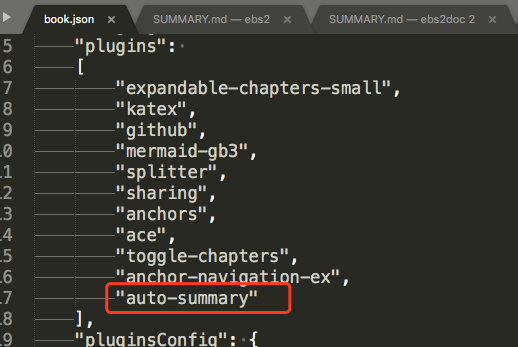
4.本书建议使用typeora 进行编辑,用它编辑时不能默认生成网页目录(准确来说是summary.md),所以采用了插件自动生成summary.md文件,此时需要在book.json中配置插件,如下图,如果用Gitbook editor,请忽略第4及第五点所述内容。
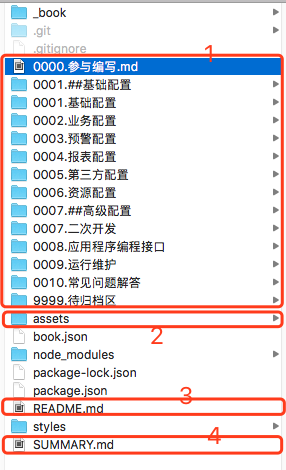
5.如下图,本书需要通过文件夹排序来实现生成菜单的排序,由于是修改的第三方插件,自定义排序功能相对实现比较困难(默认按字母升序排列),所以务必遵循以下几点书写要求即可:
- 文件夹以“[0000~9999].文件夹名”命名
- 生成的网页目录是按照目录的文件的一号标题确定的
- 每个目录至少要求存在一个markdown 文件,否则不会生成相关信息
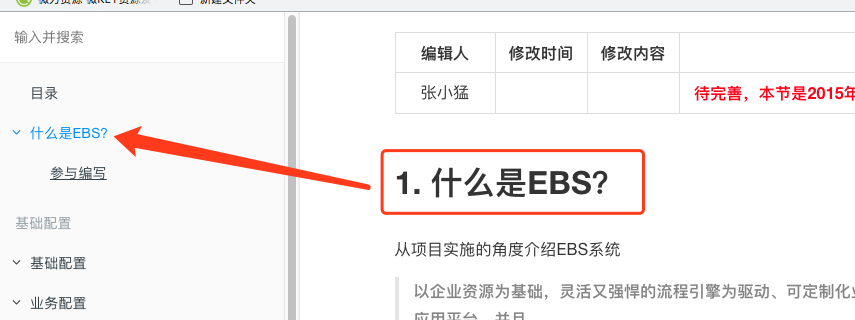
- 根目录中的readme.md,系统会自动用一号标题生成,如下图:
- 下图中2、4部分通常不用管手工去维护,尤其是4.
- 文件夹中或文件夹中一号标题中包含“##” ,系统会自动生成分隔符。
4.
1.2. 编写工具
typora 编辑器:
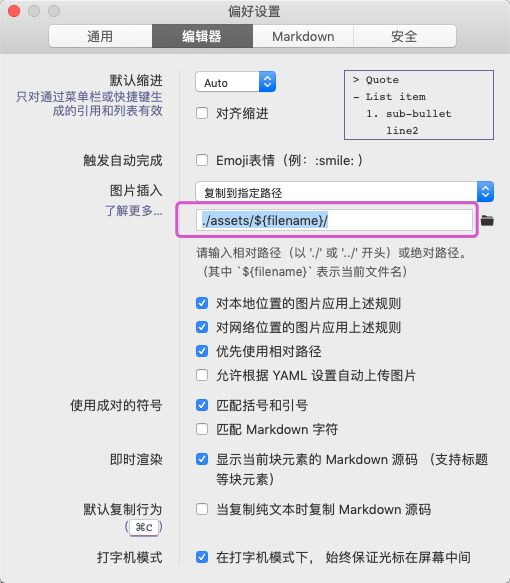
用该编辑器需要对图片工具进行设置,用以保证图片粘贴功能正常使用,默认粘贴图片后图片路径是包含盘符的路径,这不是我们想要的,设置如下:
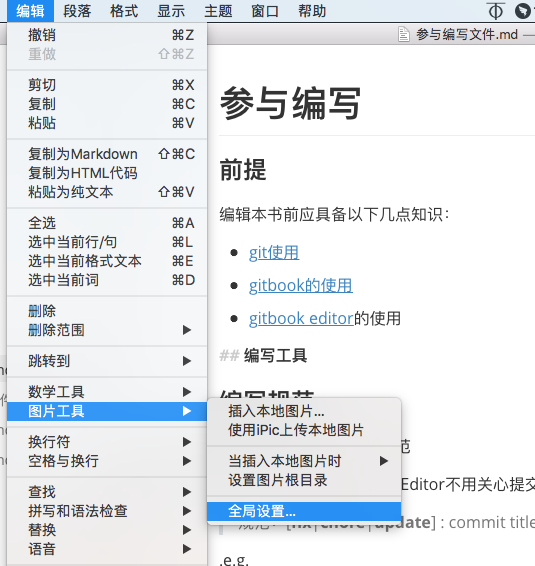
图片复制到指定路径:./assets/${filename}(截图适用老版本编辑器)
1.2.1. 编写规范
编辑本书建议按照如下规范
- git 提交格式(gitbook Editor不用关心提交格式)
规范:[fix|chore|update] : commit title +(换行)+ commit describe msg 。
.e.g.
git commit -m 'fix: fix some bugs
bug describe '
1.2.2. 支持插件
Syntax
The plugin has a basic syntax:
<div class="ace"><div class="aceCode" data-config={"edit":false,"lang":"c_cpp","check":false,"theme":false}>{%raw%}// This is a hello world program for C.
#include <stdio.h>
int main(){
printf("Hello World!");
return 1;
}{%endraw%}<br></div></div>
edit: if this is set to true, the code will be editable by the user.
lang: the language for syntax highlight. If this is not specified, it will fallback to 'c_cpp' by default. For the full list of keyword for each language, please check out the github page of ace here, all the related files are starting with prefix mode-. For instance:
mode_c_cpp.js ----> c_cpp
mode_java.js ----> java
...
check: if this is set to false, syntax validation will be disabled.
theme: the theme for the editor, the default is 'chrome'.
monokai
coffee
...To use the plugin just modify an existing blockquote and prepend a line matching pattern [!type]. By default types NOTE, TIP, WARNING and DANGER are supported. You can extend the available types by providing a valid configuration (see below for an example).
  > [!NOTE]
  > An alert of type 'note' using global style 'callout'.
  > [!NOTE|style:flat]
  > An alert of type 'note' using alert specific style 'flat' which overrides global style 'callout'.
As you can see in the second snippet, output can be configured on alert level also. Supported options are listed in following table:
| Key | Allowed value |
|---|---|
| style | One of follwowing values: callout, flat |
| label | Any text |
| icon | A valid Font Awesome icon, e.g. 'fa fa-info-circle' |
| className | A name of a CSS class which specifies the look and feel |
| labelVisibility | One of follwowing values: visible (default), hidden |
| iconVisibility | One of follwowing values: visible (default), hidden |
Multiple options can be used for single alerts as shown below:
  > [!TIP|style:flat|label:My own heading|iconVisibility:hidden]
  > An alert of type 'tip' using alert specific style 'flat' which overrides global style 'callout'.
  > In addition, this alert uses an own heading and hides specific icon.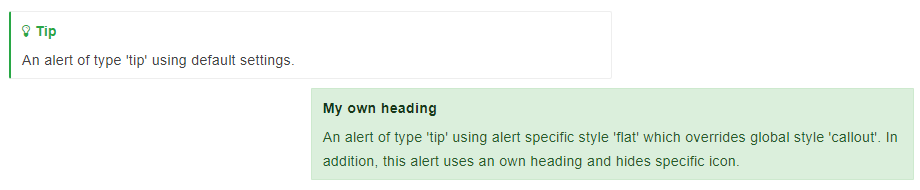
Mermaid plugin for GitBook
Plugin forGitBook3 which rendersMermaiddiagrams and flow charts detected in the book markdown.
How to install it?
You can use install viaNPM:
$ npm install gitbook-plugin-mermaid-gb3And use it for your book with in the book.json:
{
"plugins": ["mermaid-gb3"]
}
How to use it?
Just put the code into fenced code block and tag itmermaidkey word like this:
graph TD;
sequenceDiagram
prevail... John-->>Alice: Great! John->>Bob: How about you? Bob-->>John: Jolly good!
Gantt diagram
插件功能 [x] 给页面H1-H6标题增加锚点效果 [x] 浮动导航模式 [x] 页面内顶部导航模式 [x] 导航标题前的层级图标是否显示,自定义H1-H3的层级图标 [x] plugins["theme-default"],页面标题层级与官方默认主题的showLevel层级关联 [x] plugins["theme-default"],插件样式支持官网默认主题的三种样式:White、Sepia、Night [x] 在页面中增加标签,会在此处生成TOC目录 [x] 在页面中增加标签,不会在该页面生成悬浮导航 [x] config.printLog=true,打印当前的处理进度,排错很有用 [x] config.multipleH1=false,去掉丑陋的多余的1. 序号(如过您的书籍遵循一个MD文件只有一个H1标签的话)
1.2.3. gitbook-plugin-auto-summary-follow
Plugin for gitbook to automate generate SUMMARY.md with file and folder ,modified plugin gitbook-plugin-auto-summary
1.2.4. Rules
- Sorted by filename and folder
- Ignore files which are with prefix
_ - Pick first heading text as title
- Pick first heading text as title that contains '##' as depart
1.2.5. How to use
{
    "plugins": ["auto-summary-follow"]
}
1.2.6. Rules
- Sorted by filename
- Ignore files which are with prefix
_ - Pick first heading text as title
- Parts can be defined in
book.json
其他插件
参见gitbook.json配置文件