1. 客户配置
客户管理模块主要用于管理系统中客户数据,但不限于客户信息管理,一切简单的数据维护都可以通过此模块实现。
1.1. 客户分类
客户大类
指客户的一个大类别,如:“加盟商”作为为客户管理,且加盟商又可以分为“普通加盟商”、“潜在加盟商”、“意向加盟商”等小类,那么客户大类就是“加盟商”,客户大类主要充当目录和建表的作用,即一个客户大类对应一个物理数据表。
客户小类
如上“客户大类”讲解中的客户细分的小类,如“潜在加盟商”
数据库结构
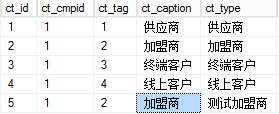
分类存于表"ebs2java.dbo.mps_csttype",如上“加盟商”在本示例中有两个小类,ct_tag 均为2,ct_id表示具体小类类别ID
1.2. 基本配置
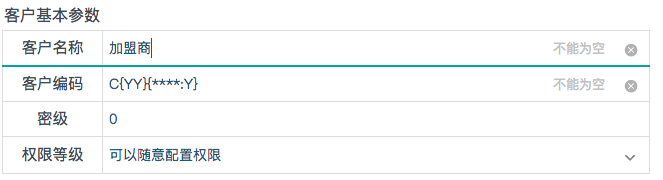
其中,客户名称指“客户小类”,客户编码指创建客户的cc_code 字段生成的规则,密级指保密等级,用于权限分级(如何使用未知),权限等级目前支持上图所示的方式。
1.3. 权限
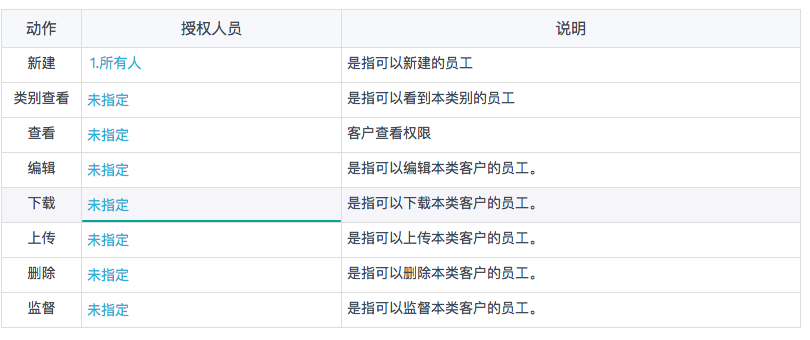
具体配置略。
1.4. 关联功能
1.5. 编辑模板
<table style="width: 780px; " class="tablenull" border="0" html="" data-sort="sortDisabled">
<tbody>
<tr class="f24 firstRow">
<td style="height:80px;font-family: 宋体;" colspan="3" align="center">
<span style="text-decoration: none;"><strong> 加 盟 商 信 息 </strong></span>
</td>
</tr>
</tbody>
</table>
<table id="td_cus" class="tableline excel" cellspacing="0" cellpadding="0" border="0" style=";width:780px">
<tbody>
<tr class="firstRow">
<td style=";width:140px" align="center" caption="编号">
编号
</td>
<td name="cc_code" editable="0" style=";width:250px" caption="编号" type="string"></td>
<td style=";width:140px" align="center" caption="姓名">
姓名
</td>
<td name="cc_name" editable="0" style=";width:250px" caption="姓名" type="string"></td>
</tr>
<tr>
<td style="text-align: center;">
性别
</td>
<td name="cc_gender" editable="0" style="" caption="性别" type="int" source="男|女" readonly="readonly"></td>
<td style="text-align: center;">
身份证
</td>
<td name="cc_identno" editable="0" style="" caption="身份证号码" type="string"></td>
</tr>
<tr>
<td style="text-align: center;">
生日
</td>
<td name="cc_birth" editable="0" style="" caption="生日" type="datetime" fmt="yyyy-mm-dd" readonly="readonly"></td>
<td style="text-align: center;">
电话号码
</td>
<td name="cc_mobile" editable="0" style="" caption="手机号码" type="string"></td>
</tr>
<tr>
<td style="text-align: center;">
来源
</td>
<td name="cc_source" editable="0" style="" caption="来源" type="string"></td>
<td style="text-align: center;">
状态
</td>
<td name="cc_status" editable="0" style="" caption="状态" type="string"></td>
</tr>
<tr>
<td style="text-align: center;">
联系地址
</td>
<td name="cc_addr" editable="0" style="" caption="联系地址" type="string" colspan="3"></td>
</tr>
</tbody>
</table>1.6. 显示模板
<table style="width: 780px; " class="tablenull" border="0" html="" data-sort="sortDisabled">
<tbody>
<tr class="f24 firstRow">
<td style="height:80px;font-family: 宋体;" colspan="3" align="center">
<span style="text-decoration: none;"><strong> 加 盟 商 信 息 </strong></span>
</td>
</tr>
</tbody>
</table>
<table id="td_cus" class="tableline excel" cellspacing="0" cellpadding="0" border="0" style=";width:780px">
<tbody>
<tr class="firstRow">
<td style=";width:140px" align="center" caption="编号">
编号
</td>
<td name="cc_code" style=";width:250px" caption="编号" type="string"></td>
<td style=";width:140px" align="center" caption="姓名">
姓名
</td>
<td name="cc_name" style=";width:250px" caption="姓名" type="string"></td>
</tr>
<tr>
<td style="text-align: center;">
性别
</td>
<td name="cc_gender" style="" caption="性别" type="int" source="男|女" readonly="readonly"></td>
<td style="text-align: center;">
身份证
</td>
<td name="cc_identno" style="" caption="身份证号码" type="string"></td>
</tr>
<tr>
<td style="text-align: center;">
生日
</td>
<td name="cc_birth" style="" caption="生日" type="datetime" fmt="yyyy-mm-dd" readonly="readonly"></td>
<td style="text-align: center;">
电话号码
</td>
<td name="cc_mobile" style="" caption="手机号码" type="string"></td>
</tr>
<tr>
<td style="text-align: center;">
来源
</td>
<td name="cc_source" style="" caption="来源" type="string"></td>
<td style="text-align: center;">
状态
</td>
<td name="cc_status" style="" caption="状态" type="string"></td>
</tr>
<tr>
<td style="text-align: center;">
联系地址
</td>
<td name="cc_addr" style="" caption="联系地址" type="string" colspan="3"></td>
</tr>
</tbody>
</table>1.7. 查询模板
<table class="tablesimple b0 excel" cellspacing="0" cellpadding="0" border="0" id="tb_main" style="WIDTH:100%;white-space: nowrap;" autopagesize="0" pagecount="20" >
<tbody name="title">
<tr class="firstRow">
<td nowrap="" name="order" style="width:40px;">
序
</td>
<td nowrap="" name="cc_updated">
日期
</td>
<td nowrap="" name="cc_code">
编号
</td>
<td nowrap="" name="cc_name">
姓名
</td>
<td nowrap="" name="cc_gender">
性别
</td>
<td nowrap="" name="cc_mobile">
联系方式
</td>
<td nowrap="" name="cc_source">
来源
</td>
<td nowrap="" name="cc_status">
状态
</td>
<td nowrap=""></td>
</tr>
</tbody>
<tbody name="search">
<tr name="start">
<td nowrap=""></td>
<td nowrap=""></td>
<td nowrap=""></td>
<td nowrap=""></td>
<td nowrap=""></td>
<td nowrap=""></td>
<td nowrap=""></td>
<td nowrap=""></td>
<td nowrap=""></td>
</tr>
<tr name="end">
<td nowrap=""></td>
<td nowrap=""></td>
<td nowrap=""></td>
<td nowrap=""></td>
<td nowrap=""></td>
<td nowrap=""></td>
<td nowrap=""></td>
<td nowrap=""></td>
<td nowrap=""></td>
</tr>
</tbody>
<tbody name="details" style="DISPLAY:none">
<tr value="{cc_id}" ondblclick="toggleselect(this)">
<td align="center" name="order" nowrap="" onclick="toggleselect(this)" width="20">
{order}
</td>
<td nowrap="" fmt="mm月dd日/ph点" name="cc_updated" width="180" align="left">
{cc_updated}
</td>
<td nowrap="" name="cc_code">
<a href="javascript:g0()" onclick="disp1cst('{cc_id}','{cc_name}')" width="200">{cc_code}</a>
</td>
<td name="cc_name" align="left" width="200">
{cc_name}
</td>
<td nowrap="" name="cc_gender" align="center" width="80">
{cc_gender}
</td>
<td nowrap="" name="cc_mobile" align="center" width="150">
{cc_mobile}
</td>
<td nowrap="" name="cc_source" align="center" width="100">
{cc_source}
</td>
<td nowrap="" align="center" name="cc_status" width="100">
{cc_status}
</td>
<td nowrap="" name="tools" align="center"></td>
</tr>
</tbody>
</table>1.8. 客户详情模板
1.9. 标签
1.10. 预警
1.11. 开发
1.11.1. 客户自助注册
微信菜单
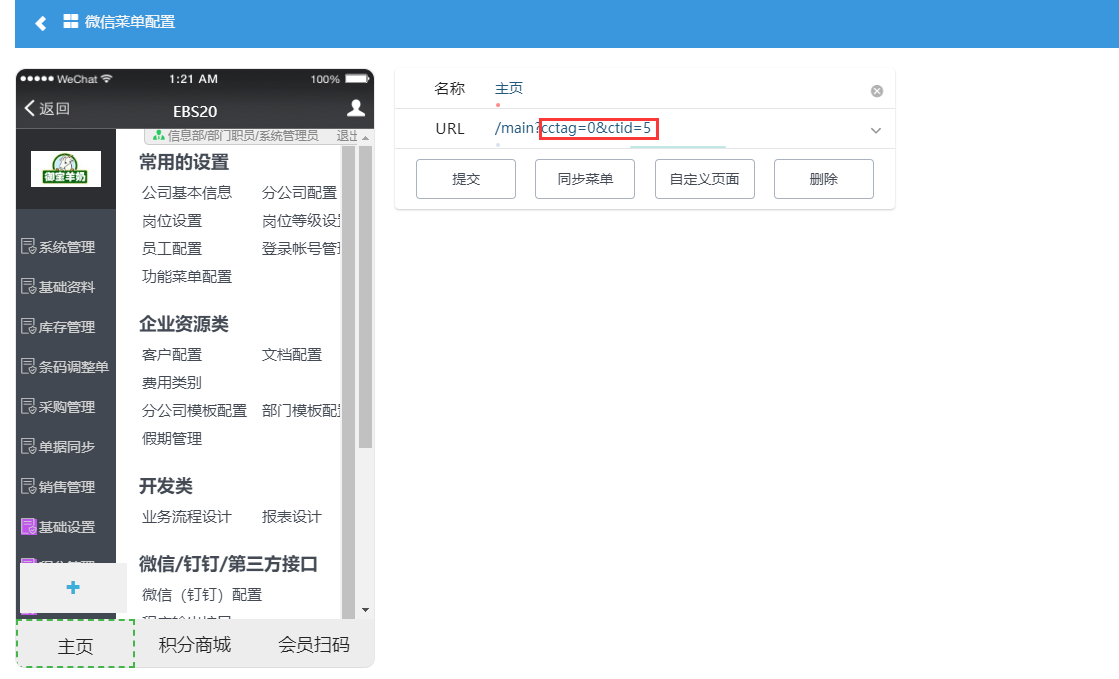
- 红框处表示菜单需带上的客户分类(cctag)和客户类型(ctid),具体参数值可在客户配置界面->基本信息中查看。
- 配置后,通过此链接注册的客户,系统会自动将该客户归属至此类别下,并在系统员工表(mps_employee),登录表(mps_login),角色表(mps_login_role)中插入一条该客户信息。并允许客户登录。
客户开发
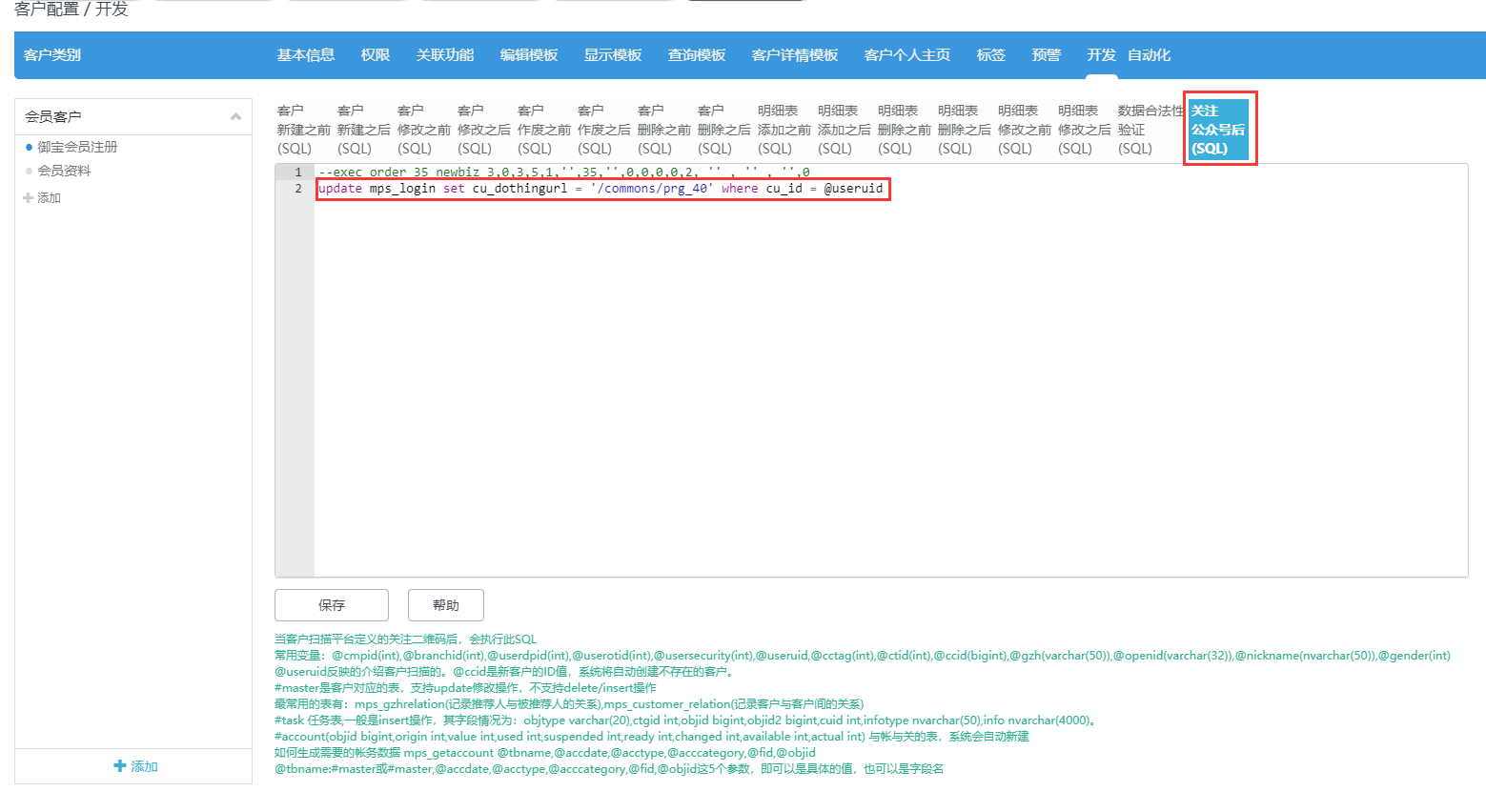
- 在客户配置->开发->关注公众号后(SQL)中,可对关注公众号后的用户进行二次开发。
- 在用户登录表(mps_login)中有一个cu_dothingurl字段,该字段存放的是用户注册完成后跳转的链接信息。若该字段为空,则系统自动跳转微信菜单链接,否则跳转此链接地址。
注意: 在自定义SQL中,若存在返回结果集,则第一个结果集中必须存在一个字段名字为 result,并且值为ok
注意:在用户完成注册后,请及时清空登录表(mps_login)中cu_dothingurl字段的值!
1.12. 菜单
菜单配置如下图所示: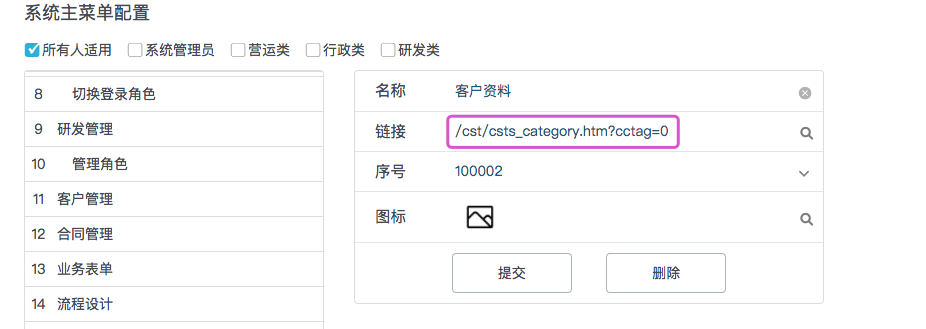 需要注意的是该菜单需要配置一个cc_tag参数,指大类的tag值,即ct__tag,该参数默认值为0.比如本例中就应该配置cctag=2,即加盟商(/cst/csts_category.htm?cctag=2或独立类别菜单/cst/csts.htm?cctag="+cctag+"&ctid="+ctid+"&csttype="+tohex(caption)) ;
1.12.1. 注意
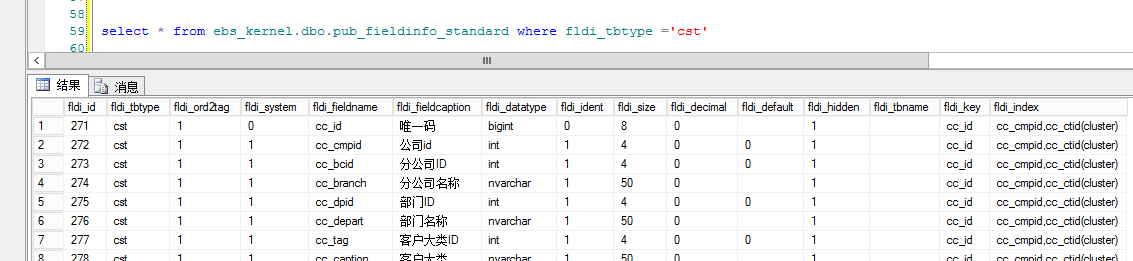
如果表未生成系统字段,请检查pub__fieldinfo__standard是否有值