1. 表单配置
<table style="width: 900px; " class="tablenull" border="0" html="" data-sort="sortDisabled">
<tbody>
<tr class="f24 firstRow">
<td style="height:80px;font-family: 宋体;" colspan="3" align="center">
<strong><span style="text-decoration: underline;"> 表单名称 </span></strong>
</td>
</tr>
</tbody>
<tbody>
<tr class="f12 firstRow">
<td width="33%" valign="bottom" style=";width:33%" type="string">
表单单号:<span field="ord_no"></span>
</td>
<td width="34%" align="center" valign="bottom" style=";width:34%" type="string">
创建人:<span field="ord_creator"></span>
<td width="34%" align="right" valign="bottom" style=";width:34%" type="string">
创建日期:<span field="ord_date" name="ord_date" fmt="yyyy-mm-dd"></span>
</td>
</tr>
</tbody>
</table>
<table id="td_demo" class="tablesimpleline excel" cellspacing="0" cellpadding="0" border="0" prdlists="0" ctgid="0" topn="20" data-sort="sortDisabled" style="width: 900px;">
<tbody>
<tr class="firstRow" html="">
<td colspan="6" style=";background-color:#f5f5f5" type="string">
<strong>基本信息</strong>
</td>
</tr>
</tbody>
<tbody>
<tr>
<td align="center" style="width: 100px;"></td>
<td style="width:200px"></td>
<td align="center" style="width: 100px;"></td>
<td style="width:200px"></td>
<td align="center" style=";width:100px"></td>
<td style="width:200px"></td>
</tr>
</tbody>
</table>1.1. 字段
1.1.1. 表单字段属性
合法性
自定义程序
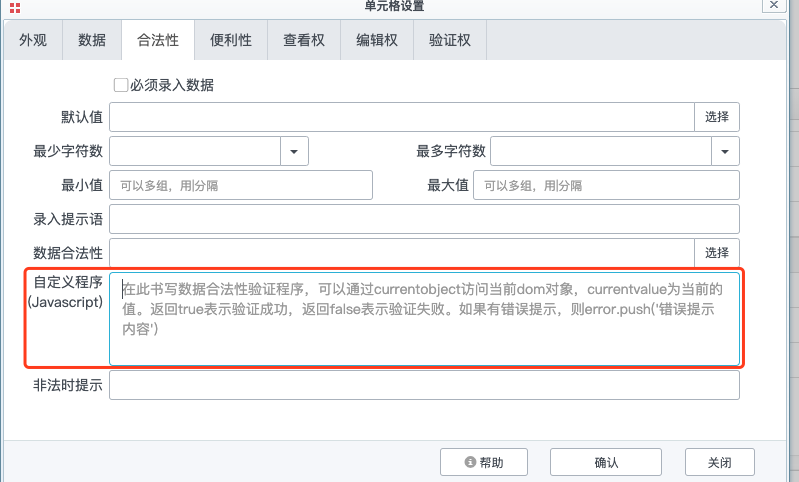
//currentobject1为当前对象的jQuery实例。currentvalue为当前对象值
if(currentvalue!=$("td[name='otherfield']").myval())
{
        return true;
}else{
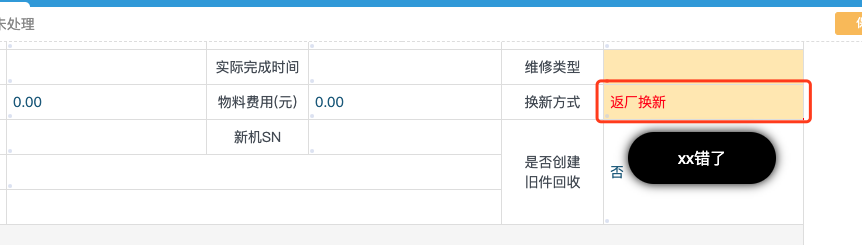
        error.push("xx错了");
        return false;
}
数据发生改变时会弹出错误信息,并且在提交保存时,会提示该字段信息错误。
fmt
fmt 用于修饰数据格式,按照不同的数据类型不同,又包括日期、数字
日期
| 字段类型 | 可用修饰符 | 说明 | 举例 |
|---|---|---|---|
| 日期-年 | y/Y | ||
| 日期-月 | m/M | ||
| 日期-日 | d/D | ||
| 日期-时 | s/S | ||
| 日期-分 | n/N | ||
| 日期-秒 | s/S |
数值
| 字段类型 | 可用修饰符 | 说明 | 举例 |
|---|---|---|---|
| 数值-整数>0 | |||
| 数值-整数>0 | |||
| 数值-小数>0 | |||
1.2. 子模板
1.2.1. 添加子模板
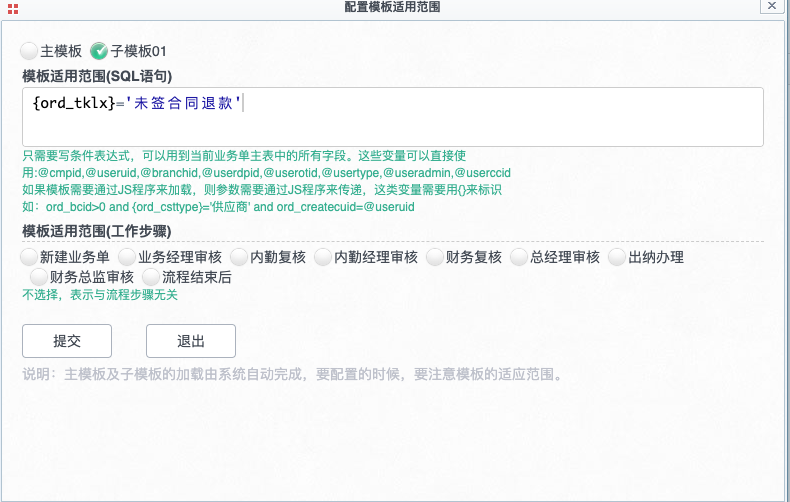
添加子模板,并设置每个子模板适用条件,变量用 "{字段}"的形式使用。
1.2.2. 模板容器
主表单模板中添加模板容器
<div name="subform" caption="子模板01" ></div>1.2.3. 事件触发
触发加载子模板的事件,可以说是个input 内容改变的事件,如:
function inputchange(obj1)
{

    var name1 = $(obj1).getAttr("name","") ;

    if (name1=='ord_tklx')
        loadsubmd({ord_tklx:$(obj1).myval()}) ;

}
1.3. 审核情况
要想将流程步骤显示到表单或打印模板,需要在流程步骤中设置勾选“本工作执行完后,显示在签字列表中
<!--要想将流程步骤显示到表单或打印模板,需要在流程步骤中设置勾选“本工作执行完后,显示在签字列表中”-->
<table id="table_4433" nopopmenu="0" signiture="0" class="tableline excel" style="width:660px" cellspacing="0" cellpadding="0" border="0">
    <tbody>
        <tr class="firstRow" name="title">
            <td colspan="5" style=";background-color:#f5f5f5">
                <strong>审核情况</strong>
            </td>
        </tr>
        <tr>
            <td colspan="1" rowspan="1" style="text-align: center;" width="null" valign="null">
                序
            </td>
            <td type="string" align="center">
                流程节点
            </td>
            <td type="string" align="center">
                审核人
            </td>
            <td type="string" align="center">
                审核意见
            </td>
            <td type="string" style="width: 200px;" align="center">
                审核时间
            </td>
        </tr>
    </tbody>
    <tbody name="details" class="mynone">
        <tr value="{ord2_id}">
            <td style=";width:20px" name="order" caption="序号" type="string">
                {order}
            </td>
            <td name="jb_title" style=";width:100px;" caption="工作标题" type="text" nowrap="true">
                {jb_title}
            </td>
            <td name="jb_executor" style=";width:200px" caption="审核人" type="text" nowrap="true">
                {jb_depart}/{jb_executor}
            </td>
            <td style=";width:200px;" name="jb_text" caption="审核意见" type="text">
                {jb_text}
            </td>
            <td name="jb_enddate" editable="0" style=";width:150px;" caption="审核时间" type="text" fmt="yyyy-mm-dd hh:nn:ss" align="center">
                {jb_enddate}
            </td>
        </tr>
    </tbody>
</table>