1. EBS-用友集成
1.1. U8C-EBS
1.1.1. U8客商基本档案-创建
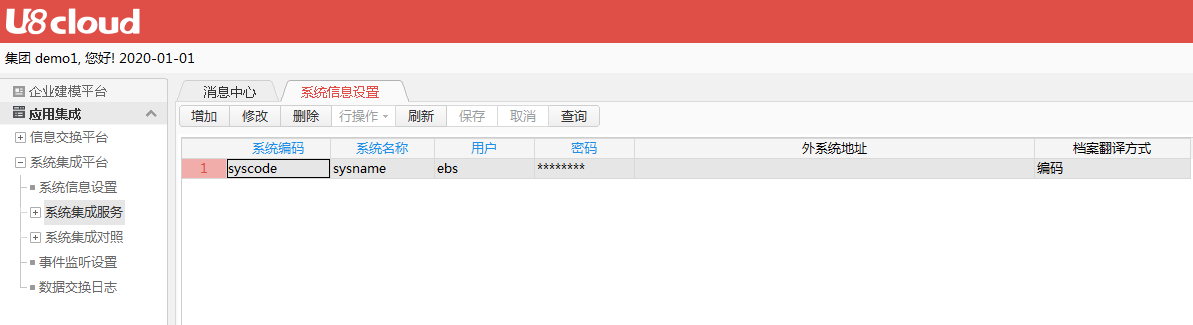
- 1.添加接口用户
- 2.调用测试示例
创建了三个客商档案信息,创建的客商档案参数信息中均是指定的具体分公司,但是u8默认新建均是创建到集团,需要人工分配
curl --location --request POST 'http://172.16.223.130:8088/u8cloud/api/uapbd/custdoc/insert' \
--header 'Content-Type: application/json' \
--header 'usercode: ebs' \
--header 'password: 4297f44b13955235245b2497399d7a93' \
--header 'trantype: code' \
--header 'system: syscode' \
--data-raw '{"cbdocvo":{"parentvo":{"creator":"zhangsan","custcode":"01990011","custname":"用友1","custprop":"0","custshortname":"用友","pk_areacl":"01","pk_corp1":"01"}},"trantype":"code"}'

curl --location --request POST 'http://172.16.223.130:8088/u8cloud/api/uapbd/custdoc/insert' \
--header 'Content-Type: application/json' \
--header 'usercode: ebs' \
--header 'password: 4297f44b13955235245b2497399d7a93' \
--header 'trantype: code' \
--header 'system: syscode' \
--data-raw '{"cbdocvo":{"parentvo":{"creator":"zhangsan","custcode":"01990012","custname":"用友2","custprop":"0","custshortname":"用友2","pk_areacl":"01","pk_corp1":"02"}},"trantype":"code"}'


curl --location --request POST 'http://172.16.223.130:8088/u8cloud/api/uapbd/custdoc/insert' \
--header 'Content-Type: application/json' \
--header 'usercode: ebs' \
--header 'password: 4297f44b13955235245b2497399d7a93' \
--header 'trantype: code' \
--header 'system: syscode' \
--data-raw '{"cbdocvo":{"parentvo":{"creator":"zhangsan","custcode":"01990013","custname":"用友3","custprop":"0","custshortname":"用友3","pk_areacl":"01","pk_corp1":"02"}},"trantype":"code"}'

格式化data-raw 的具体参数即EBS中需要的客商信息,例如:
{
    "cbdocvo":
        {
            "parentvo":
                {
                    "creator":"zhangsan",
                    "custcode":"01990012",
                    "custname":"用友2",
                    "custprop":"0",
                    "custshortname":"用友2",
                    "pk_areacl":"01",
                    "pk_corp1":"02"
                }
        },
    "trantype":"code"
}- 3.EBS客商档案-U8接口 字段对应关系
| EBS字段 | U8C | 是否必传 | 说明 |
|---|---|---|---|
| 客商编码 | custcode | 按u8C规则传入 | |
| 客商名称 | custname | ||
| 客商简称 | custshortname | ||
| 客商总公司编码 | pk_cubasdoc1 | 蜀汉暂时为"" | |
| 客商总公司 | |||
| 对应公司(填写编码) | pk_corp1 | 公司主体编码 | |
| 客商类型 | custprop | 客商类型(0 - 外部单位,1 - 内部核算单位,2 - 内部法人单位,3 - 内部渠道成员) | |
| 地区分类 | pk_areacl | 所属地区(填写编码) |
1.1.2. EBS JS 接口
EBS接口配置
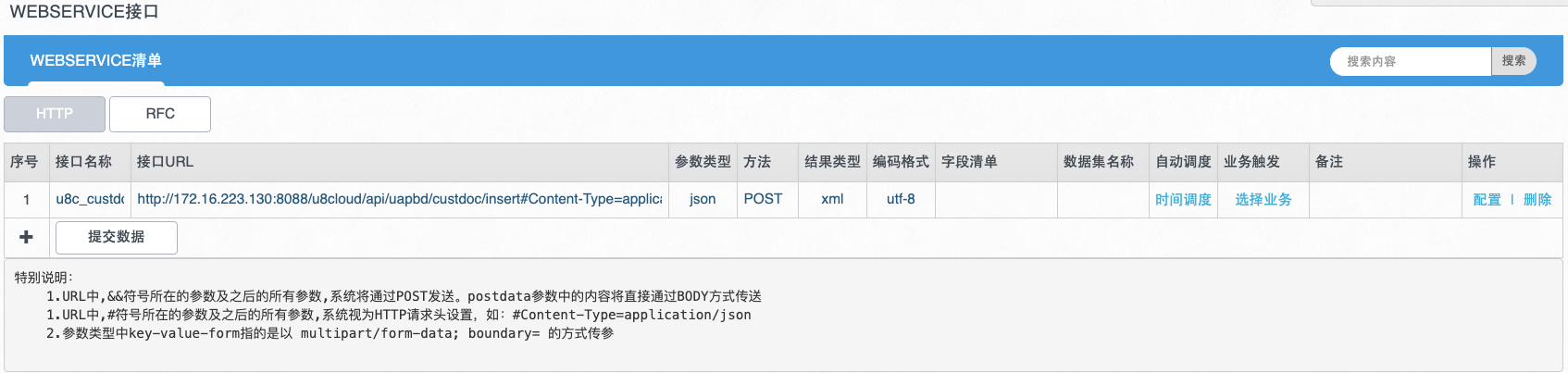
EBS接口调用
- 1.节点上设置提交前js逻辑
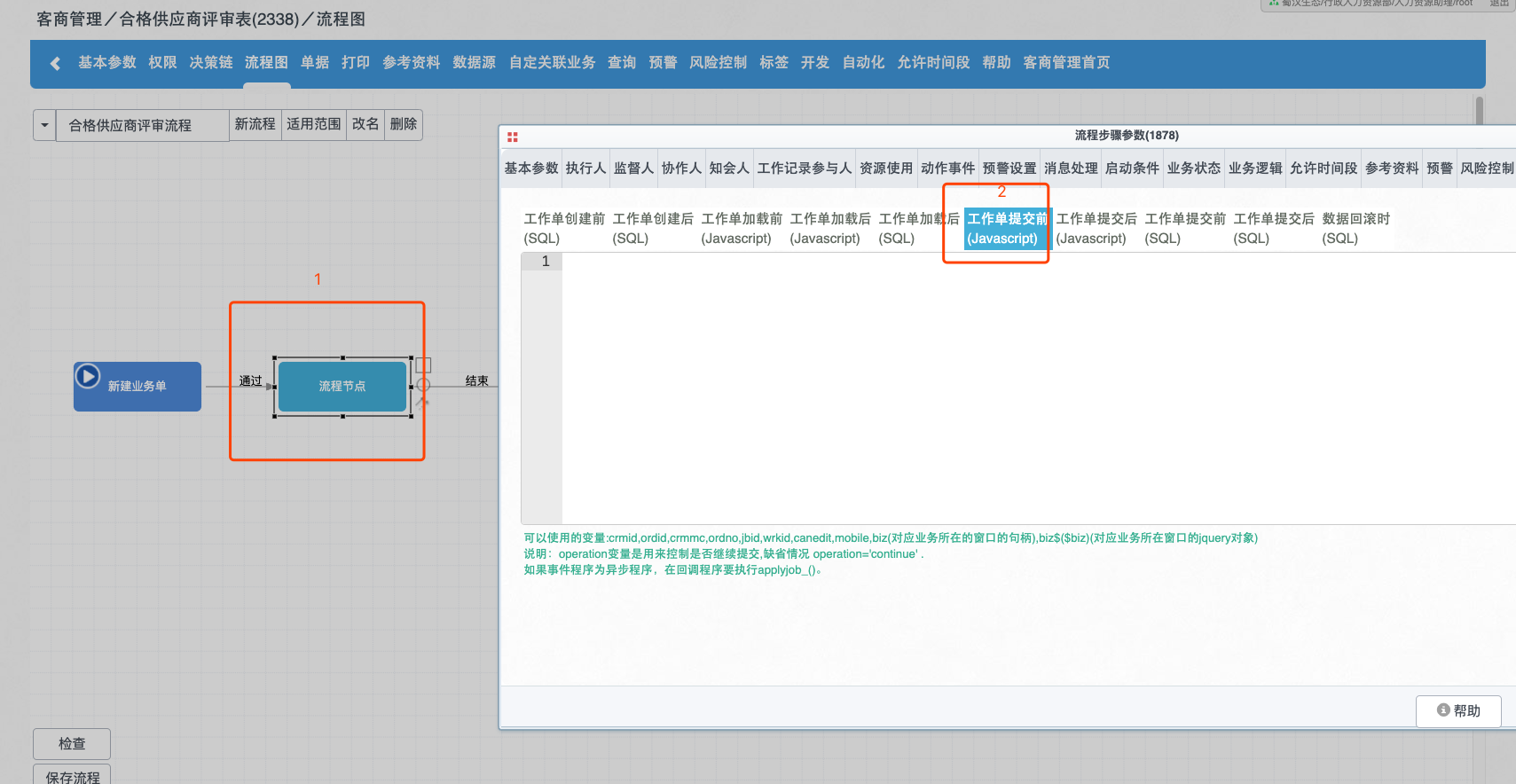
- 2 逻辑实现
if (wsstatus1 == "结束") {
    operation = "abort"; //流程在代码执行后不再提交,需要人工 operation = "continue";并调用applyjob_(); 来继续提交流程
    var parmas = { "cbdocvo": { "parentvo":{}},"trantype":"code"}; //具体参数
        var parentvo = {};
      //EBS 表单取值替换示例值,如 parentvo["creator"] = biz.$("td[name=creator],span[name=creator]").myval();
      parentvo["creator"] ="zhangsan",
      parentvo["custcode"] = "01990012",
      parentvo["custname"] = "用友2",
      parentvo["custprop"] = "0",
      parentvo["custshortname"] = "用友2",
      parentvo["pk_areacl"] = "01",
      parentvo["pk_corp1"] = "02";

      //用设置的json完善parmas
    parmas.cbdocvo.parentvo = parentvo;
      //调用接口
    runwebservice4xml("u8c_custdoc", {postdata:tohex(JSON.stringify(parmas))},
    function (iseof,data,dsname) {
            if(!iseof&&dsname=="t1"){
        if($f[_status]=="success"){
          alert("接口提交完成");
          operation = "continue";//继续提交流程
          applyjob_();
        }else{
                    alert("接口异常:" + $f[_data]);
        }
      }
    })
}
1.2. U8-EBS
1.2.1. 接口定义
定义
授权(或账号)
预处理
- 参数预处理
- 结果预处理
1.2.2. 代码编写
JavaScript
```javascript
```